 Sutra
Why read with Sutra?
- Browse a reachable Calibre-family catalog using its server address and any required credentials.
- Open compatible EPUB and PDF files for free; full CBZ and DRM-free MOBI require Pro.
- Download books for offline reading after they are available to Sutra.
Compatibility and access
| Capability | iOS | Android |
|---|---|---|
| Calibre Content Server | iOS · Free | Android · Free |
| Calibre-Web | iOS · Free | Android · Free |
| Calibre-Web-Automated with OPDS enabled | iOS · Free | Android · Free |
| Generic catalog progress sync | Not promised | Not promised |
Pro is a one-time purchase through the store for the platform you use. Prices vary by storefront; check the current listing. No subscription is required.
How to get started
- Start the relevant Calibre server or enable OPDS in the Calibre-Web variant you use.
- Make sure the server is reachable from your device and protect it with authentication as appropriate.
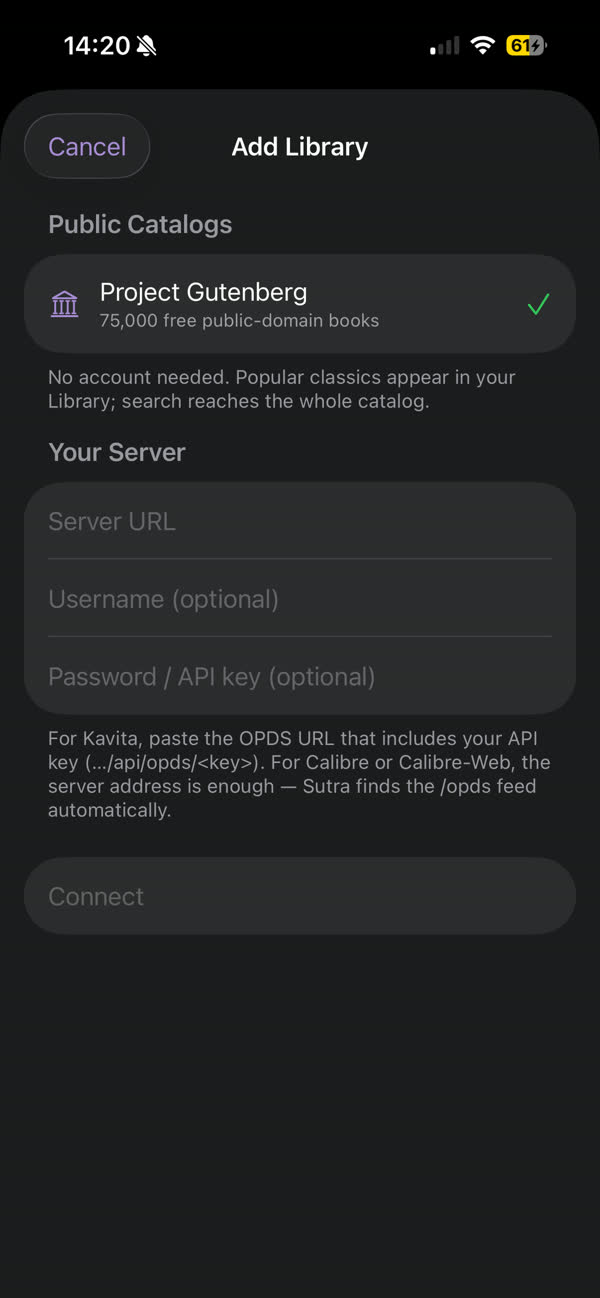
- In Sutra, choose Add Library and enter the server's base or feed URL shown by that installation. Add credentials if requested.
- Browse the library and open a supported book. Download it if you need offline access.
Important limitations
- URL shape, authentication, OPDS availability, and behavior depend on the server variant and its configuration.
- Generic Calibre-family catalog access does not imply bidirectional reading-progress synchronization.
- Do not expose an unauthenticated server directly to the public internet. Use a secure, reachable server or VPN configuration.
- Full CBZ and DRM-free MOBI require Pro. CBR and DRM-protected files are not supported.
See Sutra in action
The screenshot shows Sutra's current library and connection flow. Follow the linked setup guide for details specific to your server and configuration.

Frequently asked questions
Which Calibre servers can I connect to?
Sutra supports reachable Calibre Content Server, Calibre-Web, and Calibre-Web-Automated catalogs where OPDS or a compatible catalog endpoint is enabled.
Should I enter a base URL or a full OPDS feed URL?
It depends on the server variant and configuration. Use the address and endpoint shown in that server's settings or the Sutra Help guide for that specific variant.
Does Sutra sync reading progress back to Calibre?
Do not assume generic Calibre or OPDS access provides reading-progress synchronization. Server-specific integrations may differ.
Can I use Calibre-Web-Automated behind a separate login portal?
The catalog must be reachable by Sutra. A separate authentication portal may block the OPDS request; configure a secure route that allows the OPDS endpoint rather than sharing credentials publicly.
Which formats and tiers are supported?
EPUB and PDF reading are free. Full CBZ and DRM-free MOBI reading require Sutra Pro. Only compatible file links exposed by the server can be opened.