 Sutra
Why read with Sutra?
- Add a catalog using its OPDS feed or server address and credentials when required.
- Browse compatible EPUB, PDF, CBZ, and MOBI books; the file's format determines its Sutra tier.
- Download supported books to read offline after acquisition.
Compatibility and access
| Capability | iOS | Android |
|---|---|---|
| Generic OPDS catalog access | iOS · Free | Android · Free |
| EPUB and PDF reading | iOS · Free | Android · Free |
| Full CBZ and DRM-free MOBI | iOS · Pro | Android · Pro |
| Generic OPDS progress sync | Not promised | Not promised |
Pro is a one-time purchase through the store for the platform you use. Prices vary by storefront; check the current listing. No subscription is required.
How to get started
- Get the OPDS feed or server address from the catalog provider or administrator.
- In Sutra, choose Add Library and enter the address. Supply credentials if the catalog requires them.
- Browse the catalog and open a compatible book. Follow any download or acquisition action shown by the catalog.
- Download a supported file for offline reading when you need access without a network connection.
Important limitations
- OPDS implementations vary. Feed versions, authentication methods, file links, and server features may differ.
- Generic OPDS access does not imply server-specific sync or streaming. Kavita and Komga have separate integration behavior.
- Full CBZ and DRM-free MOBI require Pro; CBR and DRM-protected files are not supported.
See Sutra in action
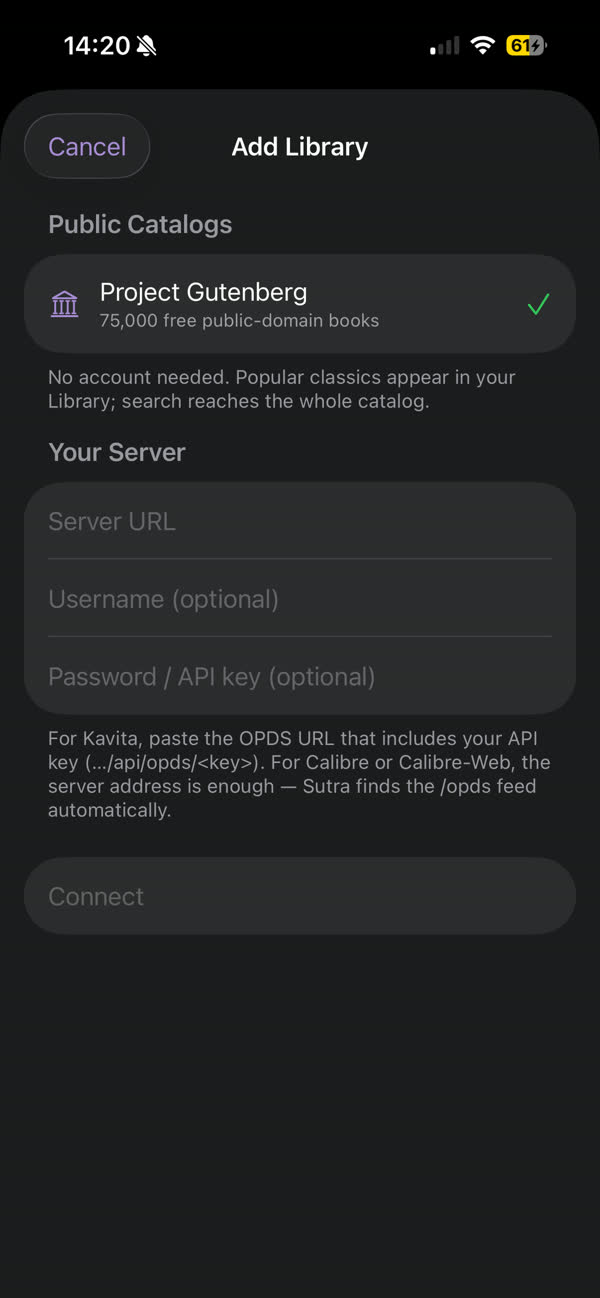
The screenshot shows Sutra's current library and connection flow. Follow the linked setup guide for details specific to your server and configuration.

Frequently asked questions
What OPDS URL should I enter?
Use the OPDS feed address supplied by the server or catalog administrator. Some servers require a server-specific endpoint and credentials.
Does Sutra support every OPDS server?
OPDS servers vary in feed format, authentication, and acquisition links. Compatibility depends on what the server exposes; consult its documentation and test the feed.
Does generic OPDS sync my reading progress?
Generic OPDS catalog access does not guarantee reading-progress synchronization. Sutra's server-specific sync integrations are separate from generic OPDS.
Which formats can I read from OPDS?
Sutra supports EPUB, PDF, CBZ, and DRM-free MOBI files where the catalog exposes compatible file links. EPUB and PDF are free; full CBZ and DRM-free MOBI require Pro.
Can I read OPDS books offline?
A compatible book can be read offline after it has been downloaded or acquired to the device.